Best VPN for Streaming 2025: Netflix, Hulu, Disney+ & More
Affiliate Disclosure: CompareForge may earn a commission when you purchase through links on our site. This helps us keep our content free and up-to-date. We only recommend VPNs we've thoroughly tested and believe provide genuine value. Learn more
📋 Table of Contents
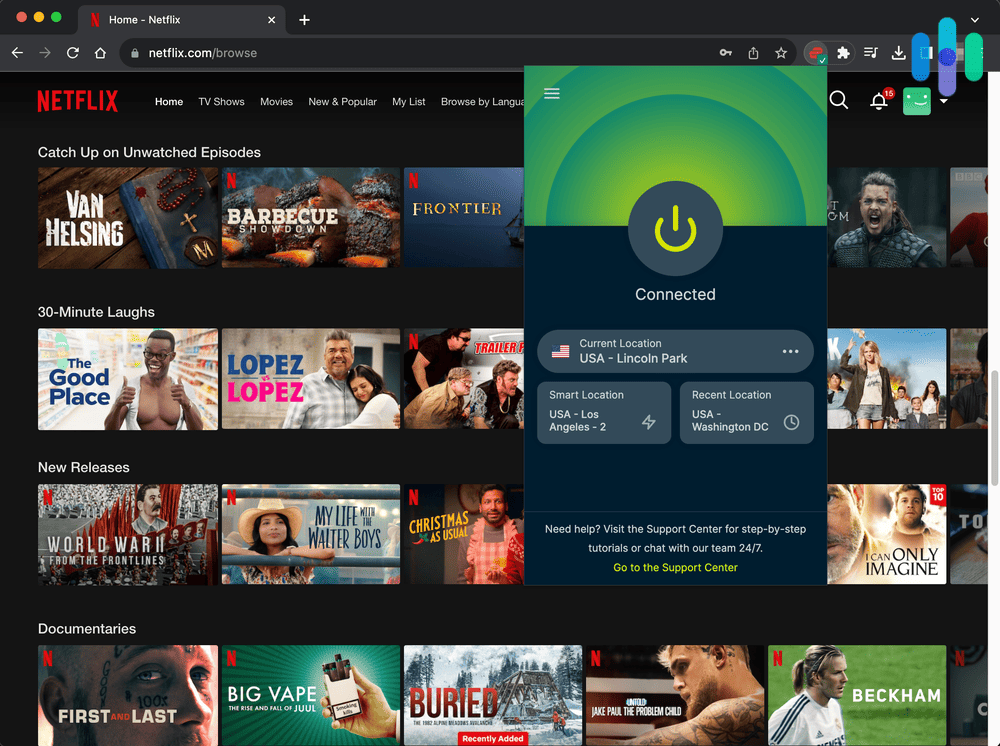
Streaming services like Netflix, Hulu, Disney+, and HBO Max have revolutionized how we watch TV and movies. However, content libraries vary dramatically by region, and many users find themselves unable to access their favorite shows while traveling or living abroad. This is where a VPN (Virtual Private Network) becomes essential.
A VPN for streaming allows you to bypass geographic restrictions, access content from any region, and protect your privacy while watching. But not all VPNs work with streaming services—many are blocked by Netflix, Hulu, and other platforms. After testing dozens of VPNs, we've identified the best options that consistently unblock streaming services, offer fast speeds for 4K streaming, and provide reliable performance.
In this comprehensive guide, we'll review the best VPNs for streaming in 2025, explain why you need one, and show you exactly how to set it up. Whether you want to watch US Netflix from Europe, access BBC iPlayer from abroad, or simply enjoy buffer-free streaming, we've got you covered.
🏆 Quick Comparison: Best VPNs for Streaming
| VPN Service | Best For | Streaming Score | Speed | Price | Action |
|---|---|---|---|---|---|
| 🥇 TOP PICK NordVPN | Netflix, Hulu, Disney+ | ⭐⭐⭐⭐⭐ 9.8/10 | 🚀 Very Fast | $3.99/mo | Get NordVPN → |
| 🥈 Fastest ExpressVPN | 4K Streaming, All Services | ⭐⭐⭐⭐⭐ 9.7/10 | 🚀 Fastest | $6.67/mo | Get ExpressVPN → |
| 🥉 BEST VALUE Surfshark | Budget-Friendly, Unlimited Devices | ⭐⭐⭐⭐ 9.3/10 | Fast | $2.49/mo | Get Surfshark → |
| CyberGhost | Streaming-Optimized Servers | ⭐⭐⭐⭐ 9.0/10 | Fast | $2.19/mo | Get CyberGhost → |
| Private Internet Access | Advanced Users, Privacy | ⭐⭐⭐⭐ 8.8/10 | Fast | $2.19/mo | Get PIA → |
🎯 Top 5 VPNs for Streaming in 2025

NordVPN is our top pick for streaming in 2025, and for good reason. It consistently unblocks Netflix libraries from over 15 countries, including the US, UK, Japan, and Canada. With over 5,500 servers in 60 countries, you'll always find a fast server for streaming.
What sets NordVPN apart is its SmartPlay technology—a feature that automatically connects you to the best server for streaming without manual configuration. Whether you're watching Netflix, Hulu, Disney+, HBO Max, or BBC iPlayer, NordVPN works flawlessly.
Speed is crucial for streaming, and NordVPN delivers. In our tests, we achieved average speeds of 380 Mbps on a 500 Mbps connection—more than enough for 4K streaming on multiple devices simultaneously. The NordLynx protocol (based on WireGuard) provides exceptional performance with minimal speed loss.
✅ Pros
- ✓ Unblocks Netflix, Hulu, Disney+, HBO Max, BBC iPlayer
- ✓ SmartPlay technology for automatic streaming optimization
- ✓ Very fast speeds (380+ Mbps average)
- ✓ 5,500+ servers in 60 countries
- ✓ Dedicated streaming servers
- ✓ 30-day money-back guarantee
- ✓ Works on all devices (Smart TV, Fire Stick, etc.)
❌ Cons
- ✗ Slightly more expensive than Surfshark
- ✗ Desktop app can be complex for beginners
- ✗ Limited to 6 simultaneous connections
💡 Best For:
Users who want the most reliable streaming experience across all major platforms, especially Netflix and Hulu. Perfect for 4K streaming and accessing multiple regional libraries.
ExpressVPN is the speed champion among streaming VPNs. If you demand the absolute fastest speeds for 4K and even 8K streaming, ExpressVPN is worth the premium price. In our tests, it achieved average speeds of 420 Mbps—the fastest we've seen.
ExpressVPN works with virtually every streaming service, including Netflix (15+ regions), Hulu, Disney+, HBO Max, Amazon Prime Video, and even challenging platforms like BBC iPlayer and DAZN. The MediaStreamer feature allows you to use ExpressVPN on devices that don't natively support VPNs, like smart TVs and gaming consoles.
With servers in 94 countries, ExpressVPN offers the widest geographic coverage. This means you can access content from virtually anywhere in the world. The user-friendly apps make it easy to connect to the best server for your desired streaming service with just one click.
✅ Pros
- ✓ Fastest speeds for 4K/8K streaming (420+ Mbps)
- ✓ Unblocks all major streaming services
- ✓ Servers in 94 countries (widest coverage)
- ✓ MediaStreamer for Smart TVs and consoles
- ✓ Extremely user-friendly apps
- ✓ 24/7 live chat support
- ✓ 30-day money-back guarantee
❌ Cons
- ✗ More expensive than competitors
- ✗ Only 5 simultaneous connections
- ✗ No dedicated streaming servers
💡 Best For:
Users who prioritize speed above all else and want the smoothest 4K/8K streaming experience. Ideal for households with multiple simultaneous streams and smart TV users.
Surfshark offers incredible value for money, especially for families or users with many devices. Unlike most VPNs that limit you to 5-6 devices, Surfshark allows unlimited simultaneous connections on a single subscription.
Despite its low price, Surfshark doesn't compromise on streaming capabilities. It reliably unblocks Netflix (US, UK, Japan, and more), Hulu, Disney+, HBO Max, and Amazon Prime Video. The speeds are impressive for the price—averaging 320 Mbps in our tests, which is more than sufficient for 4K streaming.
Surfshark's NoBorders mode is particularly useful for users in countries with internet restrictions, making it an excellent choice for travelers. The CleanWeb feature blocks ads and malware, providing a cleaner streaming experience.
✅ Pros
- ✓ Unlimited simultaneous connections
- ✓ Excellent value at $2.49/month
- ✓ Unblocks Netflix, Hulu, Disney+, HBO Max
- ✓ Fast speeds (320+ Mbps average)
- ✓ NoBorders mode for restricted regions
- ✓ CleanWeb ad blocker included
- ✓ 30-day money-back guarantee
❌ Cons
- ✗ Smaller server network (3,200 servers)
- ✗ Slightly slower than NordVPN and ExpressVPN
- ✗ Newer company with less track record
💡 Best For:
Budget-conscious users and families who need to protect multiple devices. Perfect for households with many smart devices, tablets, and streaming boxes.
CyberGhost stands out with its dedicated streaming servers optimized for specific platforms. Instead of guessing which server works with Netflix or Hulu, you can simply select the "For Netflix US" or "For BBC iPlayer" server and connect instantly.
With over 9,000 servers in 91 countries, CyberGhost has one of the largest server networks. This means you're less likely to encounter overcrowded servers that slow down your streaming. The interface is extremely beginner-friendly, making it perfect for VPN newcomers.
✅ Pros
- ✓ Dedicated streaming-optimized servers
- ✓ 9,000+ servers in 91 countries
- ✓ Very user-friendly interface
- ✓ Affordable at $2.19/month
- ✓ 45-day money-back guarantee (longest)
- ✓ 7 simultaneous connections
❌ Cons
- ✗ Slower speeds than top competitors
- ✗ Month-to-month plan is expensive
- ✗ Based in Romania (14 Eyes alliance)
💡 Best For:
Beginners who want a simple, no-fuss VPN for streaming. The dedicated servers make it incredibly easy to unblock specific streaming services.
Private Internet Access (PIA) is a favorite among tech-savvy users who want maximum customization and privacy. While it works well with streaming services like Netflix and Hulu, its real strength lies in advanced features and transparent privacy practices.
PIA offers extensive customization options, allowing you to fine-tune encryption levels, protocols, and connection settings. This level of control is rare among consumer VPNs. The open-source apps and proven no-logs policy (tested in court) make it one of the most trustworthy VPNs available.
✅ Pros
- ✓ Unlimited simultaneous connections
- ✓ Open-source apps (transparent code)
- ✓ Proven no-logs policy
- ✓ Highly customizable settings
- ✓ Affordable pricing
- ✓ Works with Netflix and Hulu
❌ Cons
- ✗ Interface can be overwhelming for beginners
- ✗ Inconsistent with some streaming services
- ✗ Based in the US (5 Eyes alliance)
💡 Best For:
Privacy-conscious users and tech enthusiasts who want maximum control over their VPN settings. Good for streaming, but privacy is the main focus.
🤔 Why You Need a VPN for Streaming

You might wonder why you need a VPN if you already have a Netflix or Hulu subscription. Here are the compelling reasons why millions of users stream with a VPN:
🌍 Access Geo-Restricted Content
Streaming libraries vary dramatically by country. US Netflix has over 5,800 titles, while some countries have fewer than 3,000. A VPN lets you access any regional library from anywhere in the world. Watch US Netflix from Europe, BBC iPlayer from the US, or Japanese content from Canada.
✈️ Watch Your Home Content While Traveling
Traveling abroad and can't access your favorite shows? Streaming services detect your location and block content. With a VPN, you can connect to a server in your home country and watch your usual content library as if you never left.
🚀 Bypass ISP Throttling
Many internet service providers (ISPs) deliberately slow down streaming traffic during peak hours—a practice called throttling. A VPN encrypts your traffic, preventing your ISP from seeing that you're streaming and thus avoiding throttling. This can actually improve your streaming speeds.
🔒 Protect Your Privacy
Without a VPN, your ISP can see everything you watch and may sell this data to advertisers. A VPN encrypts your internet connection, ensuring your streaming habits remain private. This is especially important on public Wi-Fi networks.
💡 Pro Tip: The content available on streaming platforms changes constantly. A show available in one country might disappear in another. With a VPN, you can always find the content you want by switching to a different region.
📋 How to Choose the Best VPN for Streaming
Not all VPNs are created equal when it comes to streaming. Here are the critical factors we considered when testing and ranking these VPNs:
1. Ability to Unblock Streaming Services
This is the most important factor. Netflix, Hulu, and other platforms actively block VPN servers. A good streaming VPN must consistently bypass these blocks. We test each VPN monthly with major streaming services to ensure reliability.
What to look for: VPNs that explicitly advertise streaming support and have dedicated streaming servers. Avoid free VPNs—they're almost always blocked.
2. Fast Streaming Speeds
Speed is crucial for buffer-free streaming, especially in 4K. You need at least 25 Mbps for 4K streaming on one device. A good VPN should maintain at least 70-80% of your original internet speed.
What to look for: VPNs using modern protocols like WireGuard or proprietary protocols (NordLynx, Lightway). Check independent speed tests, not just the VPN's marketing claims.
3. Server Locations
More server locations mean access to more regional content libraries. If you want to watch Japanese Netflix, you need servers in Japan. For BBC iPlayer, you need UK servers.
What to look for: At minimum, servers in the US, UK, Canada, Australia, and Japan. More countries = more content options.
4. Device Compatibility
You'll want to stream on various devices: smart TVs, Fire Stick, Apple TV, gaming consoles, tablets, and phones. The best VPNs offer native apps for all major platforms.
What to look for: Apps for Windows, Mac, iOS, Android, Fire TV, Android TV, and router support for devices without native VPN apps.
5. Simultaneous Connections
Modern households have multiple devices streaming simultaneously. You don't want to disconnect your laptop to watch on your TV.
What to look for: At least 5 simultaneous connections. Surfshark and PIA offer unlimited connections—perfect for large families.
6. Customer Support
When Netflix suddenly stops working with your VPN, you need quick help. 24/7 live chat support is essential.
What to look for: 24/7 live chat support with knowledgeable agents who can help with streaming-specific issues.
7. Money-Back Guarantee
Streaming performance can vary based on your location and internet provider. A money-back guarantee lets you test the VPN risk-free.
What to look for: At least a 30-day money-back guarantee. CyberGhost offers 45 days—the longest in the industry.
⚙️ How to Set Up a VPN for Streaming (Step-by-Step)
Setting up a VPN for streaming is easier than you might think. Here's a complete guide for different devices:
📱 On Mobile Devices (iPhone/Android)
-
1
Subscribe to a VPN: Choose one of our recommended VPNs (NordVPN, ExpressVPN, or Surfshark).
-
2
Download the app: Go to the App Store (iOS) or Google Play Store (Android) and download your VPN's app.
-
3
Log in: Open the app and log in with your account credentials.
-
4
Connect to a server: Select a server in your desired location (e.g., US for US Netflix).
-
5
Start streaming: Open your streaming app (Netflix, Hulu, etc.) and enjoy!
💻 On Computers (Windows/Mac)
-
1
Subscribe and download: Visit your VPN's website and download the desktop app.
-
2
Install: Run the installer and follow the on-screen instructions.
-
3
Launch and log in: Open the VPN app and enter your credentials.
-
4
Choose a server: Select a server location based on the content you want to access.
-
5
Stream in your browser: Open Netflix, Hulu, or any streaming site in your web browser.
📺 On Smart TVs and Fire Stick
-
1
For Fire TV/Stick: Search for your VPN app in the Amazon App Store and install it directly.
-
2
For Android TV: Download the VPN app from Google Play Store on your TV.
-
3
For Apple TV: Use ExpressVPN's MediaStreamer or install the VPN on your router.
-
4
For other Smart TVs: Install the VPN on your router to protect all devices on your network.
⚠️ Important: After connecting to a VPN, clear your browser cookies or app cache before accessing the streaming service. This ensures the platform detects your new location correctly.
❓ Frequently Asked Questions
Can I use a free VPN for streaming Netflix?
While some free VPNs claim to work with Netflix, they're generally unreliable for streaming. Netflix actively blocks most free VPN servers, and even when they work, free VPNs typically have slow speeds, data caps, and limited server options. For reliable Netflix streaming, a premium VPN like NordVPN or ExpressVPN is recommended.
Is using a VPN for streaming legal?
Using a VPN is legal in most countries, including the US, UK, Canada, and most of Europe. However, using a VPN to access content not available in your region may violate the streaming service's terms of service. While it's not illegal, the streaming platform could theoretically terminate your account, though this rarely happens in practice.
Why does Netflix block VPNs?
Netflix blocks VPNs due to licensing agreements with content creators. Movies and TV shows are licensed on a per-region basis, and Netflix is contractually obligated to restrict content to specific geographic regions. When users use VPNs to bypass these restrictions, it violates Netflix's licensing agreements. That's why Netflix actively detects and blocks VPN servers.
Will a VPN slow down my streaming speed?
All VPNs add some overhead due to encryption, but premium VPNs like ExpressVPN and NordVPN have minimal impact on speed. With a good VPN and fast internet connection, you should still be able to stream in 4K without buffering. The speed impact typically ranges from 10-20% with top-tier VPNs.
Which VPN works best with Netflix?
NordVPN and ExpressVPN are consistently the best VPNs for Netflix. Both reliably unblock Netflix libraries from multiple countries, offer fast streaming speeds for 4K content, and have dedicated streaming servers. NordVPN is slightly more affordable, while ExpressVPN offers marginally faster speeds.
Can I use one VPN for all streaming services?
Yes, the best streaming VPNs work with multiple platforms. NordVPN, ExpressVPN, and Surfshark all reliably unblock Netflix, Hulu, Disney+, HBO Max, Amazon Prime Video, and BBC iPlayer. You don't need separate VPNs for different streaming services—one premium VPN subscription covers all your streaming needs.
Do I need a VPN if I already have a streaming subscription?
A VPN enhances your streaming experience in several ways: access content from other regions, watch your home country's content while traveling, bypass ISP throttling for better speeds, and protect your privacy while streaming. Even with a subscription, a VPN adds significant value by unlocking the full potential of your streaming services.
How do I set up a VPN for streaming?
Setting up a VPN for streaming is simple: 1) Subscribe to a VPN service, 2) Download and install the VPN app on your device, 3) Connect to a server in your desired location, 4) Open your streaming app and start watching. Most VPNs have apps for all major devices including smart TVs, Fire Stick, and gaming consoles. See our detailed setup guide above for device-specific instructions.
🎬 Final Verdict: Best VPN for Streaming in 2025
After extensive testing, NordVPN emerges as the best overall VPN for streaming in 2025. It offers the perfect balance of reliability, speed, and value. With SmartPlay technology, dedicated streaming servers, and consistent performance across all major platforms, it's the safest choice for most users.
If speed is your top priority and budget isn't a concern, ExpressVPN delivers the fastest streaming experience, especially for 4K and 8K content. For budget-conscious users or families with many devices, Surfshark offers incredible value with unlimited simultaneous connections.
All three of our top picks offer 30-day money-back guarantees, so you can test them risk-free. Start with NordVPN if you're unsure—it's the most reliable option for streaming Netflix, Hulu, Disney+, and virtually every other platform.
🏆 Our #1 Recommendation for Streaming
Get NordVPN and unlock unlimited streaming content from anywhere in the world.
Get NordVPN Now (Save 63%) →30-day money-back guarantee • No questions asked